Multithreading In Python
Program , Process and Thread
If you’ve ever written code in any programming language, then you’ve written programs
before, something as simple as printing ‘Hello World’ to the standard output is a program.
A program is a sequence of instructions that are executed to perform a task.
I like to think of it as an algorithm running on a CPU rather than something written on a piece of paper.
This is a simple program written in the Python programming language, it performs the simple task of squaring a number that was given to it as input and returning that result.
When you run this program, you are running an instance of this program, and that is called a process!
So, a running instance of a program is a process. So far, so good.
Inside a Process
When a program is loaded into memory it becomes a process, a typical computer program has to keep track of things like variables, return addresses, function parameters etc., hence we need to allocate some memory.
This is divided into 4 sections: Stack, Heap, Data and Text.
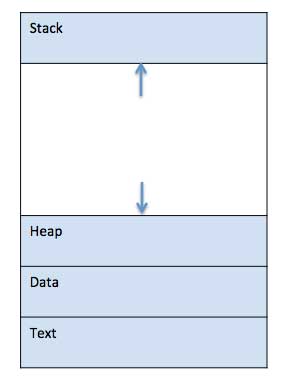
Let’s go through these briefly:
- Stack: Keeps track of temporary variables(method parameters, return addresses, local variables)
- Heap: Dynamically allocated to process during it’s runtime!
- Text: includes the current activity represented by the value of Program Counter and the contents of the processor’s registers.
- Data: global and static variables. 1
Threads
A thread is a basic unit of CPU utilization.2 In other words, a thread of execution is the smallest sequence of programmed instructions that can be managed independently by an OS scheduler.
Each process can have multiple threads, and these threads can be run on a single-core system(interleaving) or spread across multiple cores(true parallelism)
This neat diagram should put a lot of question to rest.
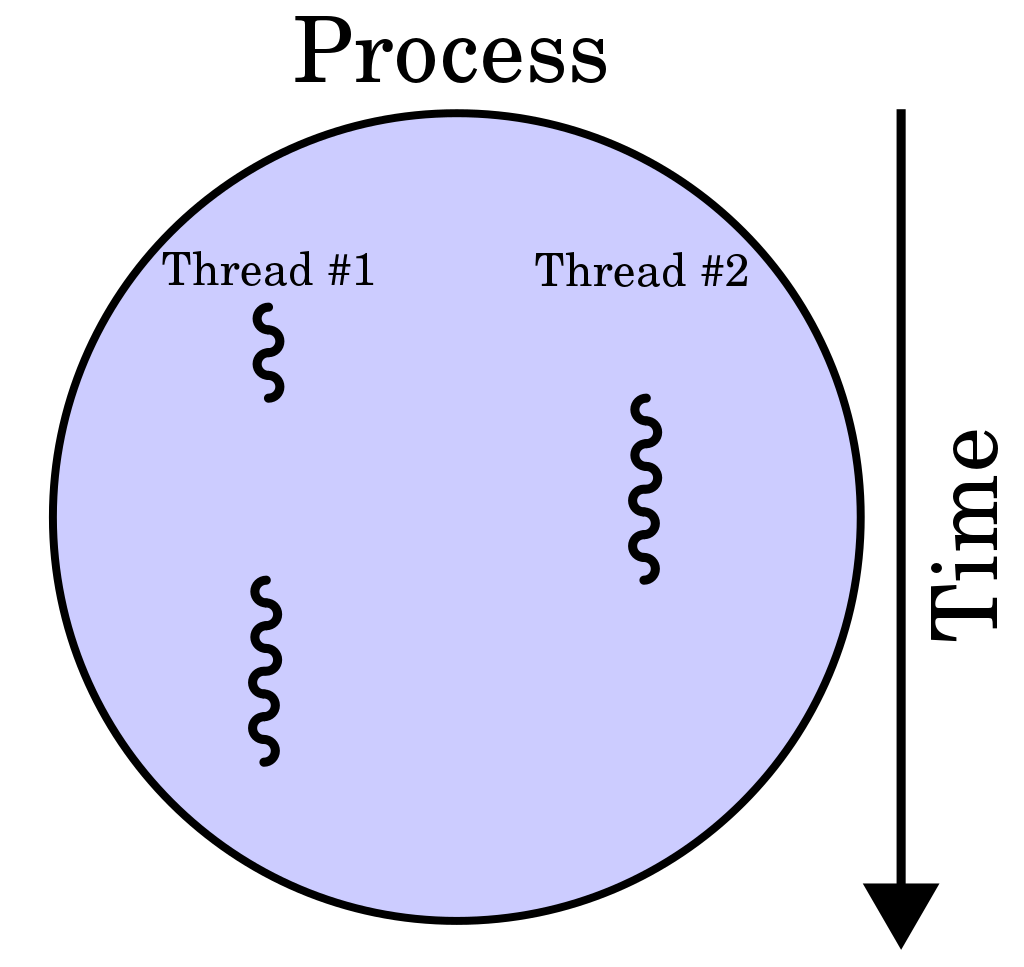
A single process can have mutiple threads running inside it, and this can be super useful when a process has to perform mutiple tasks independantly of others. Particularly true when one of these tasks in blocking, and it is desired to allow the other tasks to run freely.
Threading in action!
Say, you have a process(think program in action) that has a bunch of steps that take time and block the rest of the program, for demonstrating that ‘blocking’ I will use Python’s inbuilt time.sleep() call.
If I run this program 4 times, the approximate run time would be around 4 seconds.
Let’s check it out! I will use the perf_counter() function
provided by the time module to time this.
This will give you an output which looks like:
Sleeping for one second now…
Done sleeping.
Sleeping for one second now…
Done sleeping.
Sleeping for one second now…
Done sleeping.
Sleeping for one second now…
Done sleeping.
This took 4.04 second(s).
Doing Better With Threading
Now, instead of running this function directly I will use threads to do the same. There are two ways of doing this in Python, there’s the older way, and a newer one.
Older Way
Python provides the threading module, here we need to use the Thread class.
The Thread class represents an activity that is run in a separate thread of control.3
We need to instantiate a new Thread object with a target function, which in our case
would be the do_something function, and call it’s start method. This is part of Python’s inubilt modules, so there’s no need to install anything!
Once we call the start method, the thread is considered to be alive! It will stop being alive,
when it’s run method terminates(normally or with exception). The join method is used to wait
until the thread terminates. The example below shows both these methods in action!
Run this on your end, and you should get an output like this:
Sleeping for one second now…Sleeping for one second now…
Sleeping for one second now…
Sleeping for one second now…
Done sleeping.Done sleeping.Done sleeping.
Done sleeping.
This took 1.03 second(s).
Our program is now 75% faster! We went from 4 seconds to 1! To see how this extends to even longer runtimes, you can try running the loop for 100 iterations and see the result as well.
Without threading:

With threading:
 Threading allows us to switch from one task to another, in case there’s a blocking task(in our case, we had used
 sleep)
Threading with concurrent.futures
Python introduced the concurrent.futures module from version 3.2 which provides a
high-level interface for asynchronously executing callables. The asynchronous execution can be performed with threads, using ThreadPoolExecutor, or separate processes, using ProcessPoolExecutor.4The latter is out of the scope of this tutorial, so I will
stick to the ThreadPoolExecutor.
Now let’s run the previous example using this module!
The ouput of this will be similar to the that of the code block which used
the threading module.
The submit method here, returns a Future object, you can think of the Future object has something that encapsulates the information needed to execute a scheduled function or callable in general.
Scheduling functions with parameters and return values
So far, we have only printed a message from the do_something() function
let’s add a parameter to this function which controls the sleep time and make
it return something.
To call the function with arguments, we need to pass in the argument alongside the function reference in the submit() function. Now we will store the return values as well!
Try running the code block above and you’ll see an output like this one:
Sleeping for 5 second(s) now… Sleeping for 4 second(s) now… Sleeping for 3 second(s) now… Sleeping for 2 second(s) now… Sleeping for 1 second(s) now… Done sleeping for 5 seconds Done sleeping for 4 seconds Done sleeping for 3 seconds Done sleeping for 2 seconds Done sleeping for 1 seconds Finished in 5.02 second(s)
CPU bound vs I/O bound tasks
Downloading data or copying data from a source to a destination, are I/O bound tasks, as they depend on your system’s hard disk’s capabilities(or more broadly they depend on your I/O subsytem) or your network bandwidth. They are bound by these two variables.
CPU bound tasks on the other hand, depend on your system’s CPU architecture.
Some examples would be:
- Finding all the primes between 3 and a very large number(order of billions)
- Matrix mulitplications, machine learning algorithms which rely on a lot computation internally(eg: computing the forward pass and backward pass in a neural net)
- Graphics processing/rendering
- Search algorithms
Threading in Action: Downloading Data From Multiple URLs
Nobody wants to be stuck in ‘tutorial hell’, so I will end this article with a real world example that exploits multi-threading.
When we fire off a request to a website, there’s usually a delay till we get the response, if we do this succesively for dozens of websites, all those delays will add up.
Assume that you have to download data from 100 websites, the average delay between the response and the request is about 5 seconds, this would mean that you’re waiting for a whooping 500 seconds(~ 8 minutes).
We could, leverage multi-threading here. Say there’s two wesbites X and Y, we fire off a request to X and then , when we wait on that, the request to Y is fired! This is means, that we’re not wasting any time.
Here’s the complete example:
This takes about 6.98 seconds.
If I run this script without multi-threading, it’d take 18 seconds.
You can verify that with the following script as well.
The difference is significant!
Conclusion:
In this post I convered the following:
- Processes, Programs and Threads.
- How threads work.
- Multi-threading in Python using
threadingmodule andconcurrent.futures - Situations where threading works. (CPU bound tasks vs IO Bound tasks)
- A simple example that demonstrates the performance boost that we get while using threading.
Footnotes
[2] University of Illinois, Operating Systems
[3] Thread class, Python docs
[4] Concurrent futures, Python docs